
Import
How to bring records you already hold in a spreadsheet or another program into Bird Journal, and how the matching step works.
Updated
If your records are already in a digital form, they can usually be imported rather than typed out again. Importing works on every device — Windows, Mac, iPhone, iPad, Android and the web app.
Getting your records into a file
Bird Journal reads CSV (comma-separated text), XLS and XLSX files. If your records are in another program, these articles cover getting them out:
- Exporting records from eBird
- Exporting records from BirdTrack
- Exporting records from Wildlife Recorder
- Importing from AviSys
If your records are in a shape of your own, rearrange a copy of them to match one of the formats Bird Journal understands. For records in the UK we suggest the Wildlife Recorder format, and elsewhere the eBird one.
Leave a column blank where you do not have the information — Bird Journal is fairly relaxed about what it needs. If you have scientific names but only as a single field, leave the Genus, Species and Subspecies columns empty; matching will fall back to the common name and ask you where it cannot be sure.
Running the import
Open Tools ▸ Import.
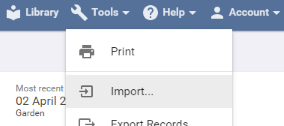
The Import Records screen opens.
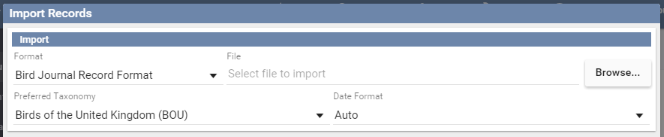
Choose the Format of the records you are importing. Bird Journal can import Bird Journal, eBird, BirdTrack, Wildlife Recorder and AviSys records. If the one you want is not listed it is simply not installed yet — open the Library, find that Record Format and press Install.
Press Browse to find your file. If it does not appear, check that the file picker is not filtering to a type your file does not have.

Check the remaining options — which of them apply depends on the format — and press Next. Any problems with the file are listed here; otherwise you go on to matching.
Matching
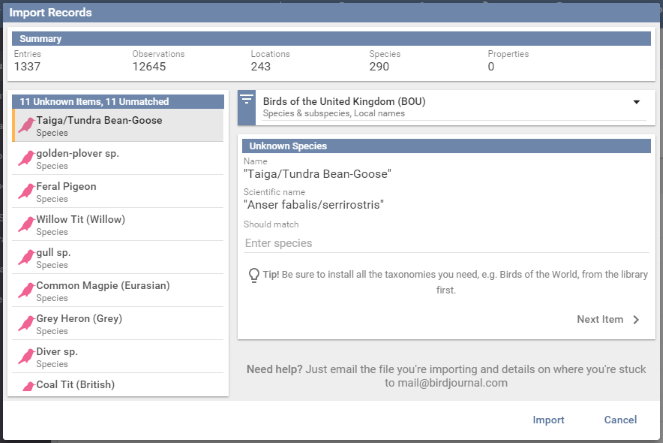
Bird Journal matches the names in your file against the locations, species and properties in your journal, and does as much of it as it safely can on its own. What is left is what it cannot decide for you — Cambridge in a file might be the one in England or the one in Massachusetts.
Everything unknown has to be resolved before the import can run. Items turn grey as you settle them.
- Species must be matched to a species Bird Journal already knows, so install the taxonomies you need from the library first — Birds of the World, for instance. If the library genuinely lacks something, you can create a custom taxonomy for it.
- Locations can be matched to an existing location, or created. A new one needs a parent location — the county or state it sits in — so that it lands in the right place in your list. Match Multiple Locations as New handles a batch of them at once.
- Properties can be matched, ignored or created. When creating one, pick the right kind — Text Box, Checkbox or Drop-down List — and decide whether it belongs to the entry or to each observation. A property whose value differs from bird to bird belongs on the observation; one that describes the whole visit belongs on the entry. It is worth a moment’s thought, as it is the sort of thing that is annoying to change afterwards.
Once nothing is left unknown, press Import. The records go in, sync, and appear on every other device signed in to the same account.
If it does not come out as you hoped
There is no bulk delete and no undo for an import. What we can do is reset your account so you can start the import again — email mail@birdjournal.com and we will sort it out.
What is not supported
These eBird features cannot currently be imported:
- The Oiled Birds observation type — eBird’s own import process does not carry all the fields it needs.
- The Breeding Code property.
- The Elevation property.
- Checklists exported with a language other than English set in your eBird preferences. Those downloads are language-specific, which makes them very awkward to read reliably.
For BirdTrack, records of things other than birds cannot yet be imported or exported.
If any of these matter to you, please post it on the ideas board — that is what tells us what to build next.